
There are two ways to deploy a Network license to any number of users:
Individual Registration #
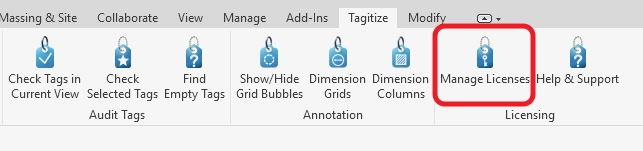
For a small team, it’s easiest to click Manage Licenses on each computer:
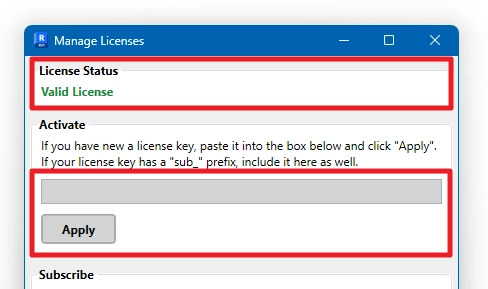
Then, input the license key under Activate and click Apply. The status should change to Valid License:
Batch Deployment #
For a larger team, central IT can deploy the same license key to all required computers at once using a registry key (.reg) file. Please contact us after purchase to request one. We will create this file for your specific subscription and ensure it will work.

To confirm, using one of the two methods above is all required for deployment. There’s no on-premise license server for you to worry about because license validation happens directly on our server. On rare occasions, your IT might need to unblock our server’s URL. If your colleagues have already trialed Tagitize though, that server connection is already working!
That said, we fully acknowledge that each company may have slightly different network setups in place. Please don’t hesitate to get in touch if it doesn’t work for you. Let us know at support@tagitize.app and we’ll find you a tailored solution!